In the watchlist panel, between the symbol list and the detail. It takes the strategy applied to the chart (preferably “Anubi ATR”; with several strategies you choose from the ⋯ menu) and computes it on the chart symbol also on other timeframes, by default 5m, 15m, 1h, 4h and 1D plus the chart's (blue border).
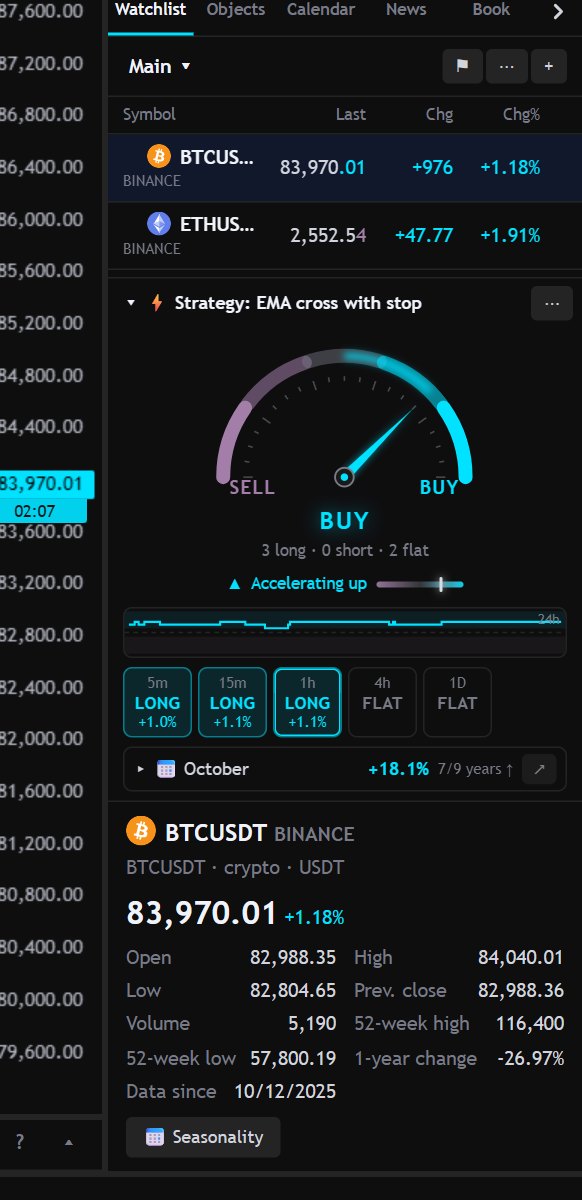
- Needle: from STRONG SELL to STRONG BUY depending on how many timeframes are long or short; longer timeframes weigh a little more. Flat counts zero.
- Acceleration: the short timeframes compared with the long ones. “Accelerating up” means the short ones are already long while the long ones aren't yet (and vice versa).
- Tiles: position on each timeframe and P/L from the average entry price to the current price; with the mouse over, quantity, price and how long it has been open. A click opens that timeframe on the chart.
- Seasonality: a row at the bottom with the average return of the current month and how many years it was positive. A click on the row opens it and shows the bars for all months (from monthly candles, up to 20 years); the ↗ arrow opens the full Seasonality.
- History: under the needle, the thumbnail of the score over the last 24 hours; a click opens the large chart (1h, 6h, 24h, 7d) with the acceleration too. The last 24 hours rebuild themselves on opening, from the trades the strategy made on each timeframe; from then on points are recorded while the app is open on this device (per symbol and strategy, up to 7 days). The rebuilt past follows the current trades: if you change the strategy or inputs, that strategy's history stays the old one.
- AI analysis: the “Analyze” button under the tiles asks for a 3-5 sentence comment on the numbers you see (verdict and acceleration, position on each timeframe, the last 100 bars' trend and the month's seasonality). Only these numbers go to the AI service, not the strategy code. The text stays until you regenerate it (⟳) and the server keeps the same comment for 10 minutes for the same numbers; if the verdict changes in the meantime, it tells you. It's an automatic summary, not advice. As soon as it's ready the text is read aloud (🔊 to reread or stop it; turn it off from the ⋯ menu, “Read the AI analysis aloud”); by voice just say “analizza il grafico” or “analisi del tachimetro”. It appears only if the server has the AI key (free Gemini:
AI_PROVIDER=geminiandAI_API_KEYin.env).
Each timeframe recalculates at the close of its bar. The ⋯ menu chooses the timeframes and turns seasonality on or off; a click on the header collapses the box to one row with the verdict only. Without a strategy on the chart only seasonality remains.