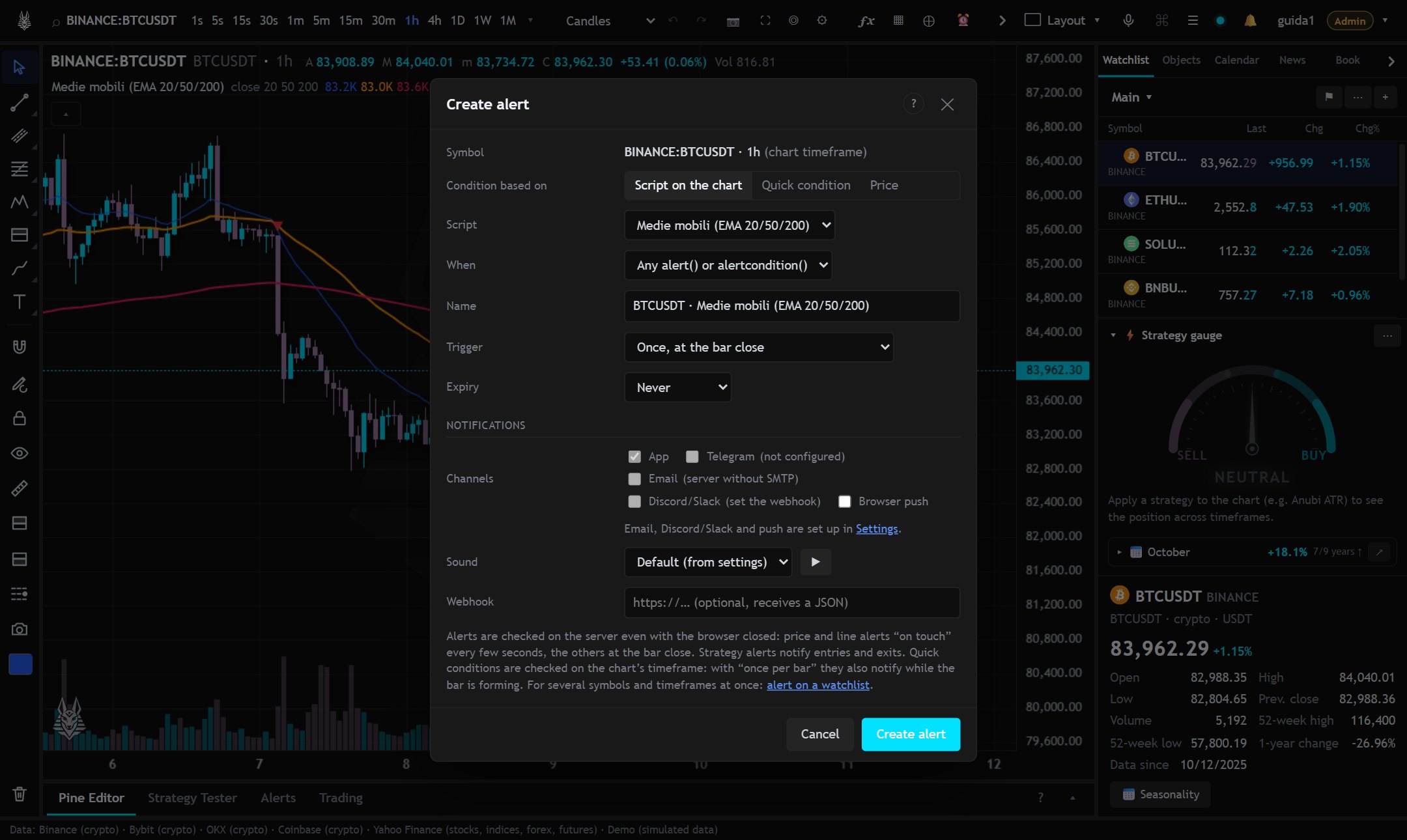
Alerts are checked on the server: they work even with the browser closed. You create them with ⏰ Alert at the top, with Alt+A at the crosshair price, from the right-click on the chart or from the ⏰ button of a drawn line.
What the condition is based on
- Script on the chart: an indicator or strategy on the chart. You can choose any
alert()oralertcondition(), a singlealertcondition, only thealert()calls, the strategy's orders, or a condition on a plot (crosses, crosses up or down, is above, is below a value, the price or another plot). A script without alerts works too, with the condition on the plot. - Quick condition: ready conditions without writing code, see Quick conditions.
- Price: a level, checked in real time.
- Drawn line: a trendline, even extended, checked in real time.
When it notifies
For scripts and quick conditions (on the chart's timeframe):
- Once at bar close: the signal is final.
- Once per bar: notifies as soon as the condition occurs, even while the bar is forming (the signal may then disappear at the close).
- Only once: then the alert turns off.
For price and lines: on touch (at most once a minute, or just once) or at the close of every minute.
Other options
- Expiration and activation of the alert.
- Channels: App, Telegram, Email, Discord/Slack, Push and Webhook (Notifications and channels); sound of your choice.
- Your latest choices stay as defaults for the next alert.
For several symbols and timeframes together: Alerts on a watchlist.